

Precision is a requirement in the manufacturing sector, not a choice. Detail manufacturing drawings serve as the only source of truth for design intent, from machining parts to assembling intricate systems. Any uncertainty in the drawings might result in worse quality, higher expenses, and production delays. For this reason, in order to achieve constant precision and efficiency, manufacturers are depending more and more on sophisticated manufacturing drawing software, such as BricsCAD V26 for Manufacturing.
BricsCAD V26 is a powerful and cutting-edge CAD software for manufacturing that enables engineers to produce precision manufacturing drawings that are understandable, compliant, and shop floor ready. With the help of knowledgeable partners like Modelcam Technologies, BricsCAD has become a reliable answer to today's industrial problems.
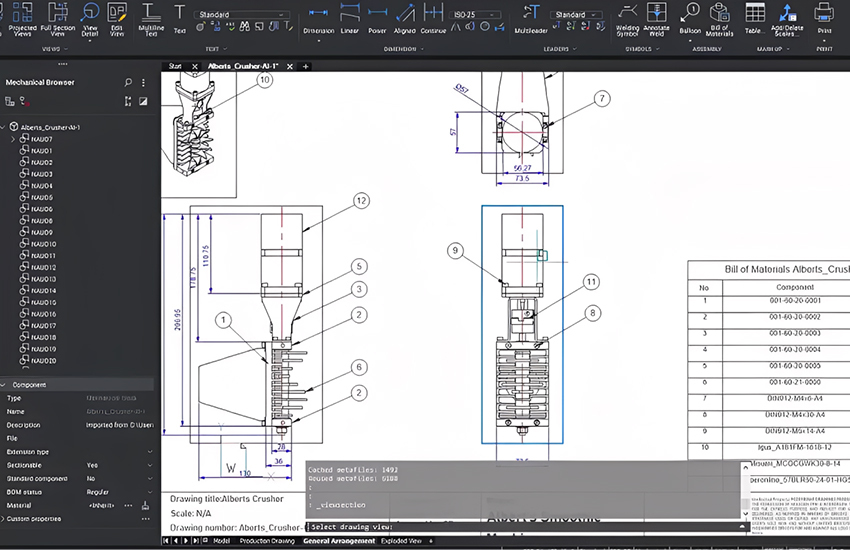
Exact requirements, such as dimensions, tolerances, materials, and assembly instructions, are communicated through manufacturing drawings. Smooth communication between the design, production, and quality teams is ensured via high-quality detail manufacturing drawings.
Manufacturers can accomplish the following by using expert engineering drawing software:
Increased manufacturing drawing accuracy
Decreased material waste and rework
Quicker approvals and fewer questions from the shop floor
Reliable shop floor ready manufacturing drawings
Manufacturers can confidently create drawings that satisfy international standards while preserving accuracy and clarity with BricsCAD.
The purpose of BricsCAD for Manufacturing is to handle practical mechanical design needs. It is a complete manufacturing CAD software that allows for intelligent 3D modeling and 2D sketching on one platform.
Among BricsCAD V26's main advantages are:
Native DWG compatibility
Drafting with high performance for major manufacturing projects
Production of 2D and 3D manufacturing drawings with ease
Because of these features, it is a dependable alternative to AutoCAD for manufacturing, providing similar power along with more flexibility and financial advantages.
Engineers can create accurate manufacturing drawings with tight tolerances and consistent annotations thanks to BricsCAD V26 features for manufacturing. Standardized layering and automated dimensioning provide clarity in all design papers.
BricsCAD Mechanical is a robust mechanical CAD software for manufacturing that has constraints, parametric tools, and libraries specifically designed for mechanical workflows. This enables designers to easily modify designs without sacrificing accuracy.
Design continuity is enhanced and data loss is decreased when 2D and 3D manufacturing drawings may be worked with in the same environment. Manufacturing drawing accuracy is ensured by engineers' ability to create production drawings straight from 3D models.
Many people acknowledge BricsCAD as a cost effective CAD software for manufacturing. It is appropriate for both small and large firms due to its flexible licensing and lower total cost of ownership.
To know more about the features of BricsCAD v26 explore our blog post, “What’s New in BricsCAD V26: A Complete Feature Breakdown” and stay updated!
AI-driven solutions are becoming more and more important in modern production to improve decision-making and productivity. By eliminating repetitive activities and increasing drafting efficiency, BricsCAD incorporates intelligent automation that promotes AI in business.
Faster detailing and more efficient workflows are made possible by BricsCAD's intelligent tools and pattern recognition. These AI-powered features facilitate data automation as well, allowing teams to concentrate on creativity rather than tedious adjustments.
The customer experience is immediately impacted by high-quality graphics. Customer confidence rises when manufacturers deliver goods on schedule and in accordance with specifications.
Organizations may respond to change requests more quickly, reduce errors, and enhance client engagement with improved customer data analysis and correct design documentation. Consistency between projects is ensured by dependable manufacturing design software like BricsCAD, which raises client satisfaction.
Tools that balance power and usability are essential for engineers. CAD software for mechanical engineers needs to enable intricate annotations, complicated geometry, and industry standards.
BricsCAD V26 is excellent in every way.
It is a flexible mechanical design software that enables engineers to:
Accurately construct intricate assemblies
Continue to be consistent amongst different drawing sets
Provide shop floor ready manufacturing drawings quickly
This makes BricsCAD one of the best CAD software for manufacturing industry.
Beyond engineering, accurate design data is essential. Costing, schedules, and customer commitments are all impacted by manufacturing drawings. CAD data facilitates improved forecasting and decision-making when combined with customer relationship management (CRM) AI and sales automation tools.
Manufacturers can find inefficiencies, streamline processes, and match design results with corporate objectives by using data analysis. This illustrates how CAD technology and general AI in business collaborate to enhance overall operational performance.
Watch this useful demonstration video to understand how BricsCAD allows for precise detail manufacturing drawings:
In order to help engineers efficiently produce drawings that are ready for production, the video showcases practical workflows, detailed tools, and features.
A reliable technological partner, Modelcam Technologies provides BricsCAD solutions designed for manufacturing requirements. With extensive domain knowledge, Modelcam helps companies use BricsCAD Mechanical for Manufacturing to increase accuracy and productivity.
From deployment to training and long-term maintenance, their consulting approach guarantees that manufacturers get the most out of BricsCAD.
Success in a competitive manufacturing environment is determined by accuracy and productivity. Detail manufacturing drawings created using BricsCAD V26 for Manufacturing provide the precision, dependability, and clarity needed for contemporary manufacturing.
BricsCAD is a potent CAD software for manufacturing and manufacturing drawing software that helps engineers boost productivity, improve customer satisfaction, and expand their businesses. For precision-driven manufacturing companies, BricsCAD V26 distinguishes itself as a future-ready solution supported by Modelcam Technologies.
Let’s connect: www.modelcamtechnologies.com
Email: sales@modelcamtechnologies.com
Mobile no : +91 8237016167
Modelcam Technologies provides a wide variety of Services from ART to PART from Concept Design to Industrial Modeling and Analysis for final Manufacturing.
©Copyright 2026. All rights reserved by Modelcam Technologies Private Limited PUNE.