
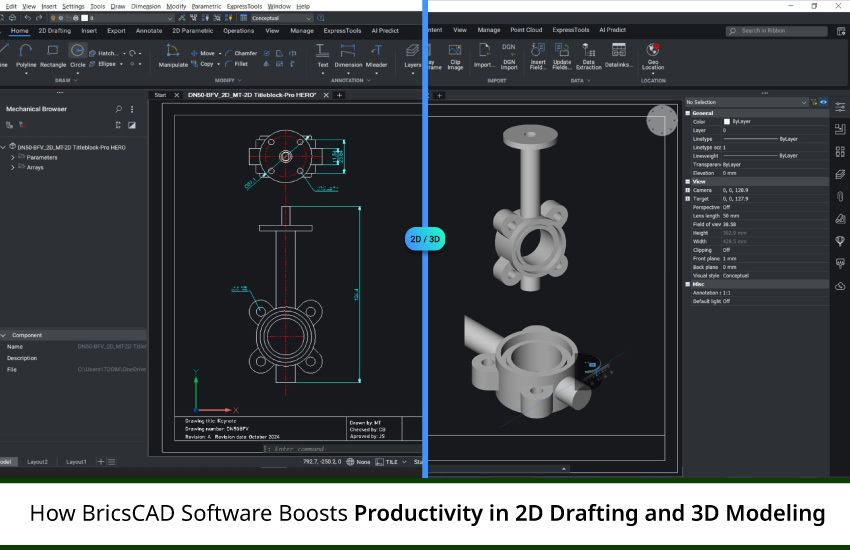
Design teams require strong tools that improve accuracy and productivity in the fast-paced engineering and manufacturing environments of today. A flexible, intelligent, and DWG-compatible CAD software is essential whether you're working on industrial assemblies, mechanical components, or architectural layouts. This is where BricsCAD software excels; it integrates contemporary automation and AI-powered improvements while providing outstanding performance in 2D drafting and 3D modeling.
BricsCAD, which was created for experts in the fields of manufacturing, mechanical design, and architecture, has sophisticated features beyond those of conventional CAD software. In this article, we examine how BricsCAD facilitates more intelligent design workflows in both 2D and 3D settings and increases productivity.
BricsCAD software offers customers a special combination of power and efficiency by fusing AI-driven improvements with the familiarity of DWG workflows, in contrast to other CAD systems. With features like Blockify, Copyguided, and 2D autoconstrain that automate tedious operations and improve drafting accuracy, it's intended to increase the productivity of engineers, architects, and designers.
BricsCAD improves productivity in 2D drafting and 3D modeling in the following ways:
BricsCAD does not require conversion or data loss because it supports native DWG compliant CAD files. Importing, editing, and sharing files is simple and saves a lot of time while working on documentation and collaboration.
BricsCAD analyzes your drawing to find repetitive geometry and automatically turns it into blocks using AI-powered CAD tools like Blockify. This keeps the design neat and optimized while also lowering the file size.
BricsCAD’s 2D autoconstrain feature streamlines the design process by auto-applying constraints for effortless modifications.This minimizes errors during revisions and expedites the production of technical drawings.
Geometry duplication is smarter with Copyguided, which ensures alignment with nearby features in the design. By preserving contextual relationships, it expedites the writing process and guarantees that your revisions blend in perfectly with your layout.
Learn more about 2D drafting in BricsCAD, through our blog, “BricsCAD: the Cost-effective 2D CAD Software for Drafting, Drawing, and Documentation”!
The 3D modeling suite in BricsCAD includes advanced tools like parametric and direct modeling, supported by AI-driven functions.
Designers benefit from BricsCAD’s hybrid approach - precise parametric modeling and intuitive direct modeling. Complete flexibility for product design or architectural modeling is provided by the ease with which you can push/pull surfaces or assign parameters for automated design adjustments.
The AI-powered tools in BricsCAD automate tedious modeling processes and identify design intent. For example, symmetrical characteristics can be replicated across assemblies or structural parts can be optimized with the help of generative AI techniques.
BricsCAD facilitates the collaboration of mechanical engineers and architects by integrating Building Information Modeling (BIM) workflows and offering a comprehensive sheet metal toolset. Bend simulation, fabrication-ready drawings, and architectural models are all easily produced.
To know more about 3D modeling, check out our blog post, “Exploring the Power of 3D Modeling in BricsCAD”!
BricsCAD is excellent at offering CAD automation tools that significantly cut down on human labor:
Enables engineers to use custom scripts to automate tedious operations.
Performance is accelerated and lag is decreased during complex processes with a multi-threaded CAD engine.
BricsCAD's AI integration allows it to generate schedules, BOMs, and even geometry changes automatically according to preset rules.
These characteristics make project execution more efficient and free up teams to concentrate on creativity rather than tedious fixes.
More than a drafting tool, BricsCAD uses AI to drive strategic advantages in CAD workflows. Early in the process, design teams can make better judgments by utilizing customer data research and predictive analytics.
BricsCAD works with AI-powered sales forecasting and data automation tools to help you create more intelligent design strategies, whether you're simulating load routes in mechanical assemblies or optimizing building layouts for energy efficiency.
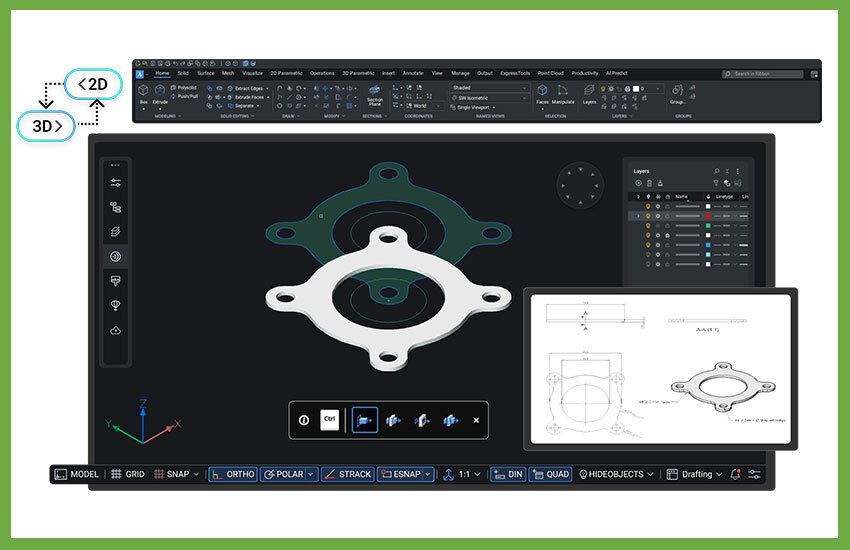
The customer experience must be improved in a productive CAD environment. Because BricsCAD facilitates cloud collaboration and real-time updates, teams can track and share changes instantaneously.
Features such as:
Using intelligent project tracking to retain customers
Optimizing voice search in design libraries
Modules for product configuration that use behavioral targeting
all support a customer-focused, flexible workflow.
Decision-making is enhanced when business information platforms and CAD tools are in sync. Integrating CRM AI, sales automation tools, and customer behavior analysis solutions with BricsCAD allows for:
Precise cost estimates
Effective distribution of resources
Design pipelines that are scalable
BricsCAD really shines in this process of turning CAD into a product that is essential to company operations.
With its innovative mix of automation and AI, BricsCAD comes highly recommended by engineering experts at Modelcam Technologies. BricsCAD enables your teams to produce more accurately and efficiently, whether you require versatile 3D modeling or quicker 2D drafting.
Additionally, Modelcam helps clients with BricsCAD customization, training, and PLM integrations, ensuring that your CAD investment is scalable and future-proof.
BricsCAD software offers a strong platform to increase your 2D drafting and 3D modeling efficiency in a world where design cycles are getting shorter and innovation is speeding up. BricsCAD is the best option for companies looking to maintain their agility and competitiveness because of its AI-powered CAD tools, smooth DWG compatibility, intelligent parametric modeling, and sophisticated automation.
With the correct resources and a partner like Modelcam Technologies, you can achieve unprecedented levels of speed, precision, and efficiency in your designs. With BricsCAD, experience the CAD of the future and turn your concepts into clever, production-ready designs.
Let’s connect: www.modelcamtechnologies.com
Email: sales@modelcamtechnologies.com
Mobile no : +91 8237016167
Modelcam Technologies provides a wide variety of Services from ART to PART from Concept Design to Industrial Modeling and Analysis for final Manufacturing.
©Copyright 2026. All rights reserved by Modelcam Technologies Private Limited PUNE.