

Consider constructing a sophisticated machine in which even minor mistakes can cost time, money, and effort. In today's fast-paced engineering environment, having the correct Mechanical CAD Software is more than simply useful; it's crucial. Engineers require powerful, user-friendly, and cost-effective tools. This is where BricsCAD Mechanical comes into play.
Over time, many engineering organizations, including those sponsored by Modelcam Technologies, have begun to embrace smarter and more efficient design tools. In this article, we'll go over the essential features of BricsCAD Mechanical software in simple terms, so you can see why it's regarded as one of the best mechanical CAD software for engineers.
BricsCAD Mechanical's ability to integrate 2D and 3D CAD design into one platform is one of its strongest features. This implies that separate tools for modeling and drafting are not necessary.
For instance, using the same software, an engineer developing a gearbox can quickly turn a 2D layout into a 3D model. This lessens confusion and saves time.
It functions effectively as both a CAD drafting software and a full CAD software for engineers due to its versatility.
Smart support is required for modern design work, not just manual labor. Automating repetitious operations is made easier with BricsCAD Mechanical's robust Mechanical Design Tools.
For example, the software can apply limitations and identify standard parts automatically. This expedites the design process and lowers errors.
This type of automation is related to developments like AI in business and AI-Driven Solutions, where software facilitates quicker and more intelligent user labor. It employs AI-driven logic to simplify difficult processes, although not being entirely AI-based.
Engineers frequently deal with several components that are joined together when working on machines. BricsCAD Mechanical's assembly modeling features make this simple.
Additionally, it automatically generates a Bill of Materials (BOM). In actual projects, this is really helpful. Automation in BOM development can save up to 30% of the time spent on manual documentation, according to industry estimates.
Engineers can evaluate how components fit together and prevent design errors early thanks to built-in data analysis. Additionally, this facilitates data automation, which improves workflows.
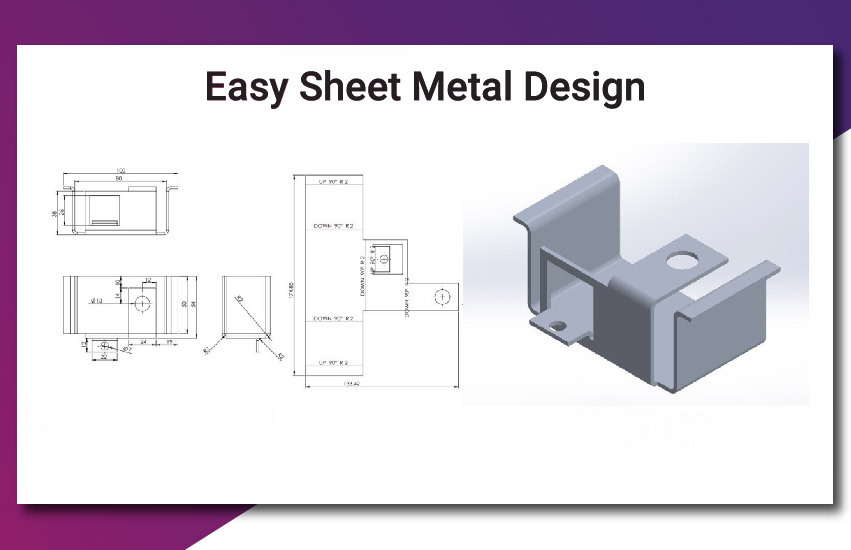
Automotive and manufacturing are two industries that frequently use sheet metal design. BricsCAD Mechanical provides easy-to-use tools for designing, editing, and unfolding sheet metal parts.
For instance, the software may automatically produce a flat pattern for production if you are building a metal enclosure. Accuracy is increased and material waste is decreased.
It is frequently regarded as an inexpensive CAD program for mechanical design that nevertheless produces expert outcomes because of these capabilities.
Parametric design is a key component of BricsCAD Mechanical. This allows engineers to define rules and relationships between different parts of a design.
For instance, associated parts will immediately update if a shaft's diameter changes. This guarantees consistency and saves time.
Because it enables novices to make changes without having to start from scratch, this feature is very useful while learning how to use BricsCAD Mechanical.
Engineers frequently collaborate with several teams using various software in real-world projects. Numerous file types, including DWG, STEP, and IGES, are supported by BricsCAD Mechanical.
This eliminates the need to worry about compatibility problems while sharing designs.
This versatility becomes a significant benefit when comparing BricsCAD Mechanical vs SolidWorks, particularly for multitasking teams.
Not many engineers want to dedicate weeks to learning new software. Users may immediately get started with BricsCAD Mechanical thanks to its clear and simple interface.
Additionally, you can alter the workspace to suit your requirements. Both productivity and the general customer experience are improved as a result.
Engineers can concentrate more on design and less on tool learning when the process runs more smoothly.
When selecting mechanical CAD software, cost is a key consideration. The high cost of many sophisticated technologies might be problematic for small firms.
BricsCAD Mechanical is a more cost-effective solution with cutting-edge capabilities. For this reason, it is frequently ranked as one of the top mechanical CAD programs for engineers.
This cost-performance balance is crucial for small technical organizations and startups.
These days, engineering is linked to business operations in addition to design. Systems supporting Customer Relationship Management (CRM) AI and Sales Automation Tools can be linked with BricsCAD Mechanical.
To better understand client wants, for instance, design data might be connected to customer data analysis. This enables businesses to enhance their goods and services.
This is one another illustration of how AI in business is influencing engineering tools in the future.
Engineering tools must adapt to the rapid changes in technology. BricsCAD Mechanical is developing with capabilities that facilitate data automation and AI-driven workflows.
Engineers can focus on innovation, cut down on errors, and save time thanks to these features. These kinds of technologies will become increasingly more crucial as more businesses use AI-Driven Solutions.
In conclusion, BricsCAD Mechanical is an effective and useful tool for contemporary engineers. It provides everything on a single platform, including sophisticated mechanical design tools and 2D and 3D CAD design.
When contrasting solutions like BricsCAD Mechanical vs. SolidWorks, its robust features, reasonable cost, and user-friendliness make it an excellent option. It is also a wise choice for anyone searching for a reasonably priced CAD program for mechanical design.
Engineers may enhance their workflow and produce better designs with less effort by learning how to utilize BricsCAD Mechanical and comprehending its main features.
BricsCAD Mechanical is unquestionably worth taking into consideration if you are looking for dependable and effective mechanical CAD software.
Let’s connect: www.modelcamtechnologies.com
Email: sales@modelcamtechnologies.com
Mobile no : +91 8237016167
Modelcam Technologies provides a wide variety of Services from ART to PART from Concept Design to Industrial Modeling and Analysis for final Manufacturing.
©Copyright 2026. All rights reserved by Modelcam Technologies Private Limited PUNE.