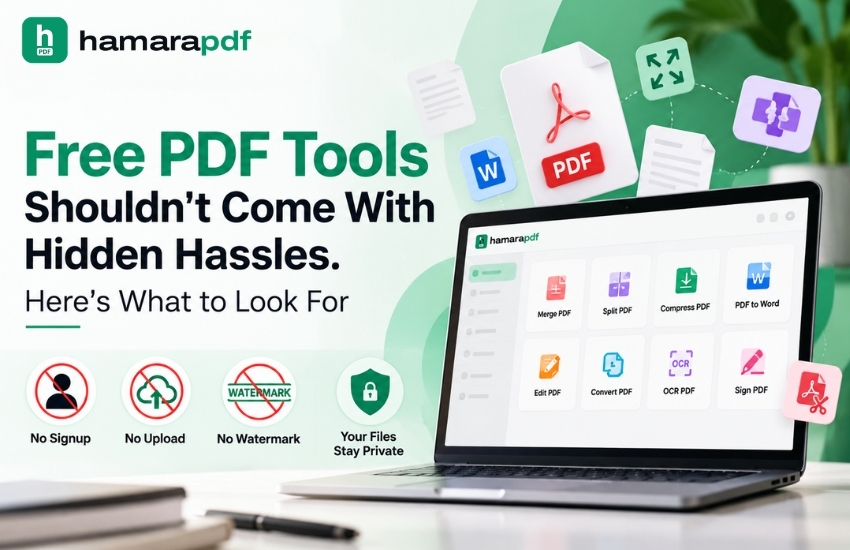
Free PDF tools can greatly simplify daily tasks. However, "free" shouldn't entail having to deal with unwanted signups, watermarks, file uploads, or difficult procedures in order to finish a straightforward operation.
Everyday work involves PDF files. They are used by people for business paperwork, reports, forms, invoices, presentations, applications, and certificates. PDF tools can save a lot of time when you need to combine two files, convert a document, compress a PDF, or make a quick update.
But not all free tools provide the same experience. Before you may use a basic feature, some may require you to register, submit your content to a server, or agree to certain restrictions. So, what are the things that you must have an eye towards when selecting a PDF tool?
The first thing to understand is what “free” actually includes.
Some tools offer free access but restrict useful features, add watermarks, or limit the number of tasks you can complete before asking you to upgrade. A useful free service should provide basic PDF processing without unnecessary limitations.
This matters especially to students, freelancers, small businesses, and anyone who handles PDF documents regularly. If a simple PDF conversion or PDF editing task involves too many steps, the tool can end up taking more time than it saves.
A good option is to choose free online PDF tools that clearly state which features are available without any payment.
Creating an account may seem like a minor step, but it is often unnecessary for basic PDF tasks.
If you simply need to split a PDF, merge files, convert a document, or reduce its size, you may not want to share your email address or create another password.
The no signup approach makes PDF tools quicker and easier to use. You can access the required feature, complete your task, and move on without managing another online account.
For people who use PDF services occasionally, this can make the overall experience much more convenient.
PDF privacy is another important factor to consider.
Many online PDF tools require users to upload their files for processing. While this can be convenient, it may not be ideal when documents contain personal details, financial information, customer records, business data, or other confidential content.
This makes no upload PDF processing an important option to look for. When files can be processed directly on the user's device, sensitive information does not necessarily have to be sent to an external server.
For businesses especially, PDF security should be considered carefully before using an online service to process important documents.
For more information, read our interesting blog post, “Your PDF Contains More Than Just Text. Are You Protecting It?”
A watermark may be acceptable on some free services, but it can be annoying when you simply need a clean, professional-looking document.
Imagine converting an important report or editing a business PDF, only to discover that the final file carries the tool's branding. This can make the document look less professional and may force you to spend extra time removing it.
When choosing between free PDF tools, check whether the service provides no watermark output with its free features.
This can be especially helpful for students, professionals, and businesses that regularly share polished PDF documents.
A good PDF tool should offer more than just one basic function.
Depending on what you need, useful features can include merging, splitting, compressing, extracting pages, rotating, unlocking, converting, and editing PDF files. Having several functions available in one place can make regular PDF editing much simpler.
A reliable PDF editor should also be easy to use, even for people without technical expertise.
Likewise, PDF conversion should be simple and straightforward rather than involving confusing menus or unnecessary steps. Whether you are converting a PDF into another format or creating a PDF from another file, the process should be easy to follow.
Convenience matters, but it should not come at the cost of privacy.
PDF files often contain sensitive information such as salary details, invoices, contracts, identification documents, customer records, or internal business reports.
Businesses are also increasingly using Data Automation and AI-driven systems to manage information. As more business processes move online, knowing where your data goes becomes increasingly important.
For this reason, PDF privacy should be considered an essential feature, not an afterthought. Before using an online PDF service, check whether your files are uploaded, stored, or processed on external servers.
AI is becoming increasingly common in software and AI in business. It can help with areas such as Data Analysis, customer data analysis, document understanding, and automation.
However, not every PDF-related task requires an AI-driven solution.
If your requirement is simply to merge two files or convert a document, a straightforward PDF tool may be enough. The best technology is often the one that solves the task efficiently without adding unnecessary complexity.
At the same time, AI-Driven Solutions can be valuable for more advanced document workflows, especially when businesses need to extract information, classify documents, or automate repetitive activities.
The key is to choose technology according to the task instead of using AI simply because it is available.
PDF tools are useful beyond personal tasks. Businesses rely on PDF documents for many everyday activities.
Sales teams may work with quotations, proposals, invoices, and customer documents. Sales Automation Tools and Customer Relationship Management (CRM) AI can support wider sales workflows, but employees still need dependable ways to manage the PDF files involved in these processes.
Customer support and administrative teams may also handle forms, reports, records, and other documents regularly.
For such users, a simple and reliable PDF solution can improve the overall Customer Experience by reducing delays and avoiding unnecessary manual work.
Before choosing a PDF service, consider a few basic questions:
These checks can help you avoid services that appear free but come with hidden limitations.
The best free PDF tools should simplify your work rather than create additional problems. You should be able to manage PDF files, edit documents, convert formats, and complete everyday tasks without unnecessary accounts, watermarks, or complicated processes.
HamaraPDF follows this practical approach by bringing multiple PDF functions together while focusing on ease of use and privacy-conscious document processing.
Whether you are a student working on assignments, a professional managing reports, or a business handling customer documents, the right PDF tools can save time and reduce everyday frustration.
“Free” should mean more than simply costing nothing. It should also mean fewer restrictions, fewer interruptions, and greater control over your documents.
Let’s connect: www.modelcamtechnologies.com
Email: sales@modelcamtechnologies.com
Mobile no : +91 8237016167
Modelcam Technologies provides a wide variety of Services from ART to PART from Concept Design to Industrial Modeling and Analysis for final Manufacturing.
©Copyright 2026. All rights reserved by Modelcam Technologies Private Limited PUNE.